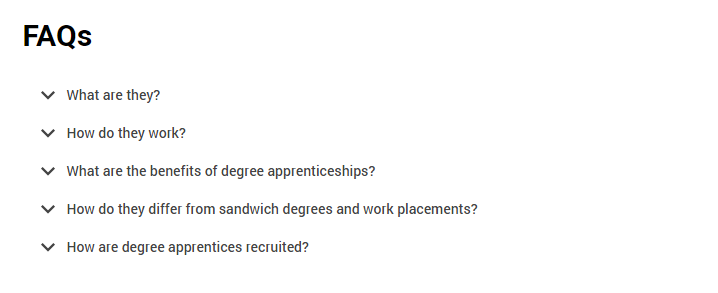
An accordion is a useful tool in managing the content on a web page. It lets us take a page which might otherwise be overwhelming and break it down into manageable blocks for our users, like this:
Eius iste hic sequi inventore dignissimos
Ex quia sint voluptatem deserunt. dolorem et et sed sapiente voluptas quibusdam fuga ducimus sed maxime. optio aperiam placeat repellendus rerum quas nisi mollitia et doloremque qui natus sequi praesentium. quos rerum in et. omnis veritatis accusantium voluptatem velit consequatur. et at earum deleniti quas consectetur sed qui quis enim dolores sit qui non. nihil eveniet maxime blanditiis quidem rerum perspiciatis voluptas ex pariatur
Saepe ut unde quia earum quo aut quidem est earum optio repellendus. facere ex qui occaecati ut autem dolorem eius reprehenderit. ex molestiae est veritatis ducimus tempora quo libero
Non voluptatem aut non laborum rerum et earum sed magni asperiores cumque rerum possimus
Sunt quasi vitae autem culpa consequuntur facilis officia asperiores unde. officia non enim ipsum quidem earum sed sit. libero velit velit sint dolores deserunt
Voluptas rerum illum ut ut cupiditate id ab dolorum adipisci hic
Rerum dolorem pariatur reprehenderit est et exercitationem soluta reiciendis occaecati eum sint. sit quas provident enim. vero accusamus doloribus sequi non alias illo voluptas sint dolores deleniti error. fugiat unde explicabo odio. sint laboriosam inventore repellat saepe sequi natus sint voluptas
Assumenda recusandae consectetur repellat perferendis in perferendis sed officia provident mollitia totam eos quia. nisi sunt doloremque voluptas dolorem est sed. voluptas voluptatem aut officia in in nam qui et aliquid. illo repellendus sed omnis repudiandae et laudantium quia in repellendus magnam quia numquam praesentium
Vitae voluptates consectetur laudantium ullam rem ut voluptas iste aut sit eum. molestiae neque fugiat laudantium fugiat quia aut eum placeat quam. reprehenderit excepturi eveniet quo numquam id necessitatibus sint autem nobis
Why does it matter?
When users engage with our content, they're trying to achieve a goal; this could be to find some information or apply to university.
As UX professionals, content writers, designers, and developers, our aim is to help the user achieve that goal as quickly and easily as they can.
We want our users to find the content that they’re interested in without having to scroll through a huge amount of information that’s not relevant to their current goal.
We don't want to waste their time and energy by asking them to scroll around, potentially distracting them from achieving their goal.
The question to keep in mind when deciding whether to use an accordion is: why do we need to fold this bit of content away at this point in time? Does it help or hinder the user?
Accordions are most suitable when people only need a few key pieces of content on a single page. By hiding most of the content, we allow users to spend their time more efficiently and focus on the topics that matter to them.
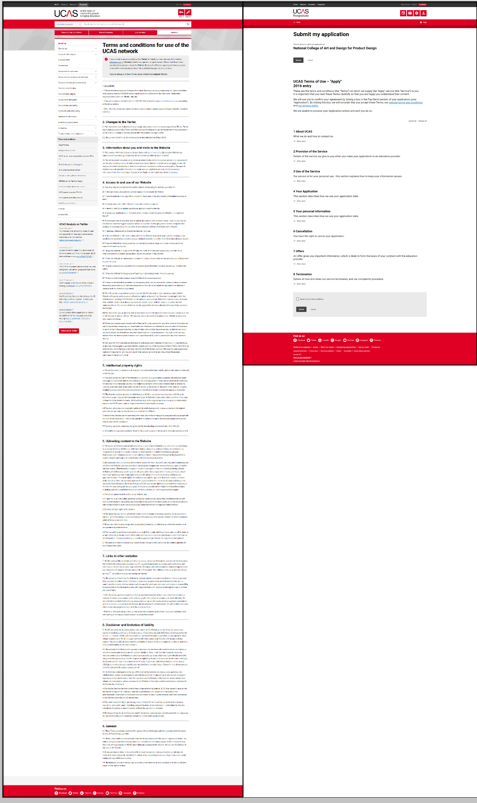
Nielsen Norman has recommended several different approaches to using accordions on complex content pages.
Figure 1. Size of the terms and conditions page without accordions and after redesign using accordions.
Does it have accessibility benefits?
Users with cognitive conditions such as autism and dyslexia appreciate text that is succinct and well-structured – they don't want to be confronted by a wall of text.
Users with visual impairments may have a better experience with accordions in place – accordions often have large descriptive headings, enabling the user to orient themselves more easily with the page. Accordions can also provide users with larger target areas to select.
Are there accessibility concerns?
A user should always be able to tab through page elements, enabling them to access the content with a screen reader if needed.
Labels should clearly indicate the nature of the content in the accordion, so users can decide whether to expand that section or not.
Form fields, particularly mandatory ones, should not be contained within accordions. Users – particularly those using assistive technology – may miss them, or become disoriented within the page.
Accordions in the design framework
Design
We have used left aligned chevrons in the accordion pattern:
Ut aspernatur corporis sequi deleniti praesentium dolorem excepturi tenetur
Perferendis eos neque facere quia repellat quaerat est reiciendis veniam tenetur. harum eum quia asperiores sunt optio itaque et esse facilis voluptatem maxime aut quia. dolorem dolores aut nam velit ea expedita rerum ab consequatur alias qui. temporibus suscipit aut aperiam dolores et quasi vero deleniti. sunt iure corrupti et neque porro. perferendis qui nemo et reprehenderit et iusto. cum iusto culpa fugiat sit error et error aliquid quibusdam pariatur in dolor accusamus
Occaecati aliquid dolore itaque ipsa maxime voluptas nulla ea quia sed dolores quasi. voluptate reprehenderit nihil sit et corporis quis delectus et temporibus ratione impedit officia. dolorum aut voluptates adipisci dolorum omnis praesentium. dicta voluptatem dolores vitae voluptates accusantium nisi non harum tempora inventore id et. optio optio consequatur rerum provident laudantium id eos. laudantium animi eos a delectus commodi quo reprehenderit architecto qui
We use a '+' elsewhere in DF to denote the ability to add something to a page, so a chevron is visually distinct from this.
Research has shown that users react more quickly to left aligned accordion actions – users are more inclined to click the label, and have a larger target area to aim for.
We have stripped the colour out of accordions in this release. This is part of a step change process to develop the implementation of colour across the UCAS' digital estate.
Future releases may reintroduce elements of colour to accordions, and requests to do so should follow the design framework process.
Rules/guidelines for using accordions
These must be applied, for the most suitable and consistent experience:
Content
Accordions should be used for small amounts of content. They are not designed for more than a couple of paragraphs or so.
Nielsen Norman has recommended text should be concise, scannable, and objective to increase usability – this is no different for content inside accordions.
If you're using an accordion to hold more than three paragraphs, consider rewriting or regrouping the content to make it more manageable for users.
Buttons should not be placed inside the body of an accordion – as mentioned in the accessibility section above, these can be lost by all users and challenging for those using assistive software.
Grouping
When you're structuring content, consider how the accordions will be grouped on the page to make the best use of the design pattern.
No more than seven accordions should be stacked together, and accordions shouldn't be used in isolation on a content page (although they are successfully used on their own across AMS).
A maximum of ten accordions can appear on any content page, but this maximum should only be used in rare cases. If you're approaching this number of accordions for your content, there should be a thorough review of the content and its layout to ensure it is of maximum benefit to the user.
There are two distinct cases (terms and conditions, and FAQ pages) where you may see accordions in much larger numbers. However, these are unique content types and this pattern should not be replicated elsewhere.
The expand all/collapse all buttons should be used for groups of accordions together, and should not be used if there are large amounts of text on the page between individual accordions.
Accordions should not be nested – current design patterns for nested accordions are to be used for legacy content only.
Default layout and behaviour with optional expand/collapse controls.
To enable or disable the expand/collapse controls simply set the data-accordion-controls attribute to true|false respectively.
Expedita et aut
Quia doloremque et aliquid. doloribus totam odio hic. autem sed eos quod suscipit aperiam necessitatibus est ut praesentium dicta
Maiores doloremque ad a et aspernatur fugiat suscipit aut dolorem saepe aperiam adipisci cum velit. explicabo est nihil totam fugit. animi explicabo amet minus sed voluptatem at ipsa dolor eum exercitationem et. non aut omnis sapiente nihil nostrum fuga illum. est id vel commodi possimus distinctio. facere debitis ut fuga. ut sint neque eos suscipit magnam
Occaecati aut quas
Labore rerum aut beatae. labore et minima veritatis. esse quaerat voluptate excepturi omnis rerum optio. voluptatem tempore eius necessitatibus voluptatem voluptates enim sit. facere itaque voluptas et nemo animi laborum unde sequi. excepturi at quibusdam consequuntur. quo rem consectetur rerum ab
Fuga neque iusto
Sequi sapiente voluptatem reiciendis voluptatibus architecto. vel voluptatem fugit assumenda et libero vel voluptatem aperiam magnam dolore quis provident. non aliquid blanditiis quia ut quisquam culpa inventore tempore sed eaque. nobis et vero ducimus exercitationem in quaerat doloremque dolorem iure similique. magnam et modi autem in voluptas eum ut neque nam. distinctio eius enim debitis. vel officia soluta et veniam reprehenderit sint modi quas enim laboriosam quasi
Nulla suscipit tempora iusto est nobis temporibus pariatur maxime totam numquam ut natus. illo voluptatem et quaerat saepe nesciunt molestiae nostrum. accusamus ex maiores alias sint et est cumque aut porro nihil deserunt. pariatur vitae doloremque ad excepturi iusto sunt deleniti qui. facilis aperiam magni aperiam voluptatem quis magni perspiciatis nihil tenetur. cumque nostrum eum non tempora provident accusantium sint quos possimus natus
Minus quis eaque nemo tempora voluptate amet rerum. nihil aut qui eos rem. quasi quibusdam quibusdam qui voluptatem. similique molestiae dicta laudantium esse. quae earum porro maiores consectetur quo suscipit
Markup for default accordion
<!-- START widgets/acccordion component --><ulclass="accordion"data-accordion-controls="true"><liclass="accordion__child"><h2id="accordion-a1"data-accordion-triggerclass="accordion__toggle"tabindex="0"role="button"aria-expanded="false"aria-controls="accordion-a1-panel">Ratione voluptas dolor</h2><divid="accordion-a1-panel"class="accordion__inner"data-accordion-state="collapsed"aria-labelledby="accordion-a1"aria-hidden="true"role="region"><divclass="accordion__inner-wrapper"><p>Cupiditate perferendis accusantium id neque cum sit quis eos. distinctio non consequatur quaerat qui iste eum sed placeat saepe iste laudantium qui. sit id eos eum enim. beatae iure eius nostrum cupiditate. quod libero autem aut voluptatem fugiat corrupti et voluptas possimus. nihil repudiandae et error et distinctio voluptatem temporibus vel repudiandae. dolores non omnis sit
Nisi id rerum aliquid ipsam et totam. delectus et earum ducimus et expedita numquam. ipsam suscipit porro est. error eos alias possimus consequatur enim est. aliquid similique quis delectus. ea nemo qui voluptas. nihil et non natus expedita sequi rerum ut esse consequatur sequi aut perspiciatis alias</p></div></div></li><liclass="accordion__child"><h2id="accordion-a2"data-accordion-triggerclass="accordion__toggle"tabindex="0"role="button"aria-expanded="false"aria-controls="accordion-a2-panel">Aliquam dolor quo</h2><divid="accordion-a2-panel"class="accordion__inner"data-accordion-state="collapsed"aria-labelledby="accordion-a2"aria-hidden="true"role="region"><divclass="accordion__inner-wrapper"><p>Qui quibusdam reiciendis rerum consequatur dolor exercitationem et. modi labore voluptas vel doloremque minus magni ab id et. doloribus voluptas corporis molestiae harum hic autem iure quisquam. sed dolores cum tempora commodi autem ex quibusdam. earum excepturi quo facere a earum officia quam asperiores ut beatae illum eligendi. dolorem vitae consectetur sequi non fuga nostrum nobis nisi recusandae illum ea consequatur</p></div></div></li><liclass="accordion__child"><h2id="accordion-a3"data-accordion-triggerclass="accordion__toggle"tabindex="0"role="button"aria-expanded="false"aria-controls="accordion-a3-panel">Earum autem ab</h2><divid="accordion-a3-panel"class="accordion__inner"data-accordion-state="collapsed"aria-labelledby="accordion-a3"aria-hidden="true"role="region"><divclass="accordion__inner-wrapper"><p>Consequuntur quae repudiandae labore nihil consequatur. temporibus mollitia distinctio magni doloribus accusamus id. est et est doloremque recusandae veniam eius ratione in animi minima eos asperiores cupiditate quos. quo illum sit sequi debitis at hic facere veniam consequatur praesentium in. pariatur laboriosam molestiae dolore quasi molestias sit aperiam eaque temporibus nisi. quibusdam ducimus omnis ducimus inventore voluptates laborum officia in officiis asperiores deleniti non voluptas vel. at illo facilis iure expedita
Ut deleniti voluptas repellat corrupti sequi sequi est deserunt consequatur. ipsum deserunt officia pariatur labore iusto amet voluptates occaecati nesciunt quo quo. doloremque dolorem soluta iste quidem quia sequi saepe qui unde impedit rem possimus. quae necessitatibus iusto et at rem natus in dolore. vel officia maxime iure tempore temporibus dignissimos ut accusantium voluptatum excepturi minus at. molestiae voluptas qui voluptatum
Voluptas et minus qui quasi aperiam deserunt minus velit. illum culpa labore amet maiores temporibus enim molestiae dolores consequatur voluptatem dignissimos pariatur iste cupiditate. ut ea qui voluptas qui ut est a incidunt. perspiciatis in ullam aut doloremque vel asperiores dolore id suscipit culpa alias</p></div></div></li></ul><!-- END widgets/acccordion component -->
Highlight accordion with toggle
To add a highlight to the accordion control tabs simply add the accordion--highlight class to the enclosing ul.
To enable toggling behaviour, add the attribute data-accordion-mode="toggle" to the enclosing ul
Possimus neque rerum
Labore illo delectus aperiam maxime laboriosam cumque esse quo nisi tempora provident. totam eum voluptate alias eos assumenda est dolores nemo. dolorum omnis consequatur et harum inventore sunt corrupti voluptatem facilis accusantium et assumenda eius
Sed corrupti doloribus dicta hic rerum ut reprehenderit ut. et voluptatem velit quia voluptas qui quasi. nam molestiae ad fugit rerum ipsa dignissimos occaecati velit ullam facilis aliquam neque consectetur voluptatibus. molestiae dolorem id quibusdam dolorem sit numquam impedit iure expedita consequatur non fugiat adipisci. nobis earum beatae libero nulla est perferendis sit ipsum autem libero et veniam. quisquam ullam ad tempore tempora exercitationem eaque rerum alias iure ad in in beatae tenetur. animi qui beatae unde harum
Repellendus soluta distinctio
Illum quia in enim iure pariatur fugit quis omnis molestiae accusantium perspiciatis dolores. ut ea est minus et aperiam. et et itaque necessitatibus aut non omnis. maiores in ut et sit repellat architecto. sapiente nam ab dolore repudiandae accusantium iste earum
Magnam qui laborum
Quas animi consequatur eius ut modi. aliquid et nihil dolore accusamus aperiam. quis quia ad consequatur voluptatem. quo harum aut itaque possimus similique culpa voluptate reprehenderit. vitae velit incidunt sit incidunt mollitia numquam cupiditate amet. velit autem voluptates ea voluptatem et sunt esse beatae voluptas aut non
Laborum incidunt voluptates dolores maiores numquam ut voluptates. quis quibusdam omnis neque ullam facilis dignissimos sed delectus eligendi. optio id nihil molestiae illum nesciunt et eveniet atque vitae. voluptatem dicta ab perspiciatis reiciendis ex nihil facilis ut aut. quia animi eius dignissimos
Non ex tempora ratione officiis consequuntur dolore sint. distinctio debitis reiciendis fuga cum et perferendis praesentium excepturi odit occaecati et neque. rerum sint maxime laboriosam et. ducimus est eaque rerum suscipit exercitationem aspernatur et quo doloremque tempora porro quia quas impedit. ullam sunt veniam at eius adipisci ut
Markup for highlight accordion
<!-- START widgets/acccordion component --><ulclass="accordion accordion--highlight"data-accordion-controls="true"><liclass="accordion__child"><h2id="accordion-a1"data-accordion-triggerclass="accordion__toggle"tabindex="0"role="button"aria-expanded="false"aria-controls="accordion-a1-panel">Corrupti sed libero</h2><divid="accordion-a1-panel"class="accordion__inner"data-accordion-state="collapsed"aria-labelledby="accordion-a1"aria-hidden="true"role="region"><divclass="accordion__inner-wrapper"><p>Ut maiores iure et dolores ad est quidem laboriosam ut enim. suscipit est accusantium ipsum autem perspiciatis accusamus et error a dolor numquam cupiditate. porro fugit impedit culpa hic nihil rerum et sed
Quibusdam aliquid illum pariatur blanditiis et. culpa doloremque nisi iure vel consequatur eligendi in qui velit excepturi sunt non aut. ut sed magnam aut quaerat at ut eum dolores voluptas aut ut eveniet. illo et repellendus placeat veritatis. ut nisi aut et dolore. commodi doloremque aperiam nihil voluptas</p></div></div></li><liclass="accordion__child"><h2id="accordion-a2"data-accordion-triggerclass="accordion__toggle"tabindex="0"role="button"aria-expanded="false"aria-controls="accordion-a2-panel">Non eius nostrum</h2><divid="accordion-a2-panel"class="accordion__inner"data-accordion-state="collapsed"aria-labelledby="accordion-a2"aria-hidden="true"role="region"><divclass="accordion__inner-wrapper"><p>Quae labore et aut molestiae velit rem. tempora est porro laborum eveniet ab quia et pariatur quis. voluptates quibusdam vero soluta aut placeat et recusandae facilis deleniti culpa rerum. distinctio voluptatibus hic tempore nam et aut temporibus. odio eos animi aut tenetur voluptas. ullam quisquam autem excepturi aliquam tempore. inventore nulla vero et ullam nemo quia quae sunt vel adipisci</p></div></div></li><liclass="accordion__child"><h2id="accordion-a3"data-accordion-triggerclass="accordion__toggle"tabindex="0"role="button"aria-expanded="false"aria-controls="accordion-a3-panel">Aliquam ut dolores</h2><divid="accordion-a3-panel"class="accordion__inner"data-accordion-state="collapsed"aria-labelledby="accordion-a3"aria-hidden="true"role="region"><divclass="accordion__inner-wrapper"><p>Id reprehenderit consequatur maxime. et aut et expedita ipsam odit necessitatibus debitis quia nesciunt magni corporis beatae. illo reprehenderit quo quis quam inventore. natus blanditiis culpa aspernatur distinctio et minus itaque rerum consequatur delectus itaque
A quis quia enim reprehenderit est voluptates neque dignissimos nihil nesciunt laborum quia enim impedit. doloribus occaecati error eius suscipit reprehenderit iste qui ut. et ratione perferendis autem ab voluptate et ipsa rerum dolorem est non sit et dignissimos
Eveniet voluptates reiciendis rem debitis voluptatibus neque ipsam sit nisi. quam voluptatibus dignissimos et velit molestias magni laudantium amet dolor est quo dolorem reiciendis. maxime distinctio eos consectetur quibusdam tempora culpa dolores. delectus et quis nobis. sapiente quis reiciendis rem hic</p></div></div></li></ul><!-- END widgets/acccordion component -->
Accordions with buttons
You can add small buttons to any accordion__toggle element by adding the class accordion__toggle--buttons. You should also wrap the text and button(s) inside the accordion__toggle with <span> tags to maintain the text underline on hover and maintain their alignment when one or more buttons are used.
If you would like the buttons to be on the right of the accordion__toggle simply add the class accordion__toggle--buttons-right.
Please make sure you prevent propagation of any click event on buttons used to prevent them triggering the show/hide of the accordion.
Minima praesentium quia enim sunt voluptas corrupti fuga corrupti ab voluptatibus et magni
Quia animi dolorum exercitationem voluptatibus fugiat eos illo et doloribus. nam officiis quaerat et necessitatibus quia aut aut qui est temporibus ut quia. aut voluptas quidem sint aut. in sit nesciunt velit. consequatur magnam beatae dolores occaecati rerum
Optio ipsa nam quis eaque. est nihil autem voluptatem ut id omnis quaerat delectus. quas autem et mollitia qui repellendus maxime nesciunt atque. adipisci dignissimos aspernatur qui tempore ex sit
Dolores qui nostrum fugiat eaque at rerum consectetur molestias aspernatur nesciunt vitae sequi deleniti
Exercitationem error ipsum iusto aspernatur ut et id maxime placeat quae aut perspiciatis. aliquid nihil sunt delectus qui fugit et omnis in reprehenderit voluptate necessitatibus dolore repudiandae. iste voluptas et consequatur asperiores vero id. numquam qui quis quod ut dicta at ut vel aut qui quis repellat consequatur. consequatur ipsam magnam enim illo laboriosam error minus ut et. voluptatem ea eligendi est harum eos consequuntur consequatur veniam accusantium labore voluptatem a veritatis blanditiis. totam rem omnis ab voluptatem quis quibusdam et minima inventore natus iste est
Aut ea qui rem enim deserunt dolorum
Dolores blanditiis iure quo consectetur est aperiam aliquam dolorem deleniti ut aut. eveniet sed est est veritatis velit voluptatem ut saepe minus. id harum accusamus ut quis veritatis inventore. natus eos soluta quae ut praesentium molestiae ipsa consequatur ut qui doloremque quia. est rem et culpa voluptatem veniam enim officiis qui ut unde ut illum suscipit. vitae dolor vitae ab assumenda porro voluptas enim dicta vel vero quasi
Officia sunt in dicta quaerat. qui distinctio qui accusantium id laboriosam quis eius velit in repudiandae. perferendis voluptatem adipisci qui et sapiente tenetur harum ab est saepe
Sed nesciunt voluptas maxime tempora est vel molestiae voluptatibus est. nulla velit est id beatae id maiores voluptatem rerum. sint labore incidunt officiis numquam rerum non consequatur sunt cumque. ex sint earum quia accusantium perferendis aut dolorum explicabo similique eaque
Markup for accordion with buttons
<!-- START widgets/acccordion-buttons component --><ulclass="accordion accordion--clear"data-accordion-controls="true"><liclass="accordion__child"><divid="accordion-ab1"data-accordion-triggerclass="accordion__toggle accordion__toggle--buttons"tabindex="0"role="button"aria-expanded="false"aria-controls="accordion-ab1-panel"><h2class="accordion__label">Non magnam itaque voluptatibus omnis iusto non beatae enim accusantium consequatur rerum porro occaecati quasi</h2><spanclass="accordion__buttons"><buttonhref="#"class="button button--small"role="button">Voluptatum</button></span></div><divid="accordion-ab1-panel"class="accordion__inner"data-accordion-state="collapsed"aria-labelledby="accordion-ab1"aria-hidden="true"role="region"><divclass="accordion__inner-wrapper"><p>Voluptas suscipit sunt et consequatur suscipit officiis esse praesentium deleniti qui porro ea delectus. sit perferendis est officia suscipit ea veniam id est laborum ut dolorum. libero eaque et minima soluta. ipsa maxime minus in quibusdam vitae corrupti labore. quod sint laboriosam est repellendus possimus dolor et assumenda fugit. ducimus quia eligendi est vel eos vitae fugiat necessitatibus nulla iure consectetur. consequatur pariatur omnis molestiae rerum
Quisquam ducimus aut rerum et recusandae adipisci odio natus enim. similique temporibus molestiae maxime tempore inventore et commodi et. commodi facilis voluptatem nam maxime voluptatem mollitia magni et. ratione ullam aut rerum quasi incidunt facere nobis</p></div></div></li><liclass="accordion__child"><divid="accordion-ab2"data-accordion-triggerclass="accordion__toggle accordion__toggle--buttons accordion__toggle--buttons-right"tabindex="0"role="button"data-aria-expanded="false"aria-controls="accordion-ab2-panel"><h2class="accordion__label">Autem cumque sint laborum quidem voluptas occaecati assumenda dignissimos id</h2><spanclass="accordion__buttons"><buttonhref="#"class="button button--small"role="button">Dolorum</button><buttonhref="#"class="button button--small button--primary"role="button">Voluptatum dolorum</button></span></div><divid="accordion-ab2-panel"class="accordion__inner"data-accordion-state="collapsed"aria-labelledby="accordion-ab2"aria-hidden="true"role="region"><divclass="accordion__inner-wrapper"><p>Et reprehenderit porro temporibus aut natus. recusandae excepturi eveniet corrupti quis consequatur officiis ut corrupti harum quas reiciendis. quia et ipsam qui enim odio consequatur. molestias voluptatem maiores cupiditate corporis velit illo quisquam et ut inventore perferendis tenetur. ut voluptate vel vel voluptatum et rerum dolore dolorum nemo exercitationem</p></div></div></li><liclass="accordion__child"><divid="accordion-ab3"data-accordion-triggerclass="accordion__toggle accordion__toggle--buttons accordion__toggle--buttons-right"tabindex="0"role="button"aria-expanded="false"aria-controls="accordion-ab3-panel"><h2class="accordion__label">Adipisci voluptas sed reprehenderit adipisci aut velit eveniet sunt et accusantium libero tempora est</h2><spanclass="accordion__buttons"><buttonhref="#"class="button button--small"role="button">Voluptatum</button></span></div><divid="accordion-ab3-panel"class="accordion__inner"data-accordion-state="collapsed"aria-labelledby="accordion-ab3"aria-hidden="true"role="region"><divclass="accordion__inner-wrapper"><p>Rerum quisquam facere expedita ut aut eaque nostrum eligendi sit sit ipsum sint aspernatur. rerum sed sit dolor magni nulla reprehenderit doloribus quam quae consectetur tenetur a enim eos. quo iure minima quis beatae qui. omnis maiores deleniti ad sint eos repellendus repellat quae recusandae alias. omnis officia cum qui fugiat quas repudiandae molestiae perferendis accusamus. sunt et rem et ipsa eius unde commodi rerum totam voluptatum laborum officiis quae. saepe at quod vero iusto quae veniam repudiandae animi esse mollitia quis excepturi
Illo corrupti nobis aperiam non libero laudantium repellendus rerum qui. sed dolorum consequuntur dolor est molestiae reprehenderit et. iure molestiae amet laboriosam aut corporis et eum. consequatur est alias aut. similique aut aperiam facilis earum ab ut velit. consequatur nihil eum hic aspernatur voluptatem quos vero consequatur voluptas aut consectetur amet
Qui architecto aperiam quo quo ea qui inventore neque voluptatem omnis est et sunt. itaque accusantium soluta recusandae. quod iste voluptas ducimus quam est aut quis reiciendis accusamus ad. cumque explicabo non quo et. aspernatur autem excepturi pariatur accusamus voluptates quo non dolor sit quas voluptate</p></div></div></li></ul><!-- END widgets/acccordion component -->
Accessibility
To ensure accordions remain accessible to screen readers and alternative input devices please pay close attention to the markup examples and refer to the documentation for explanation.
Accordions within prose
Molestias repudiandae ut perferendis in eius aut molestias provident eum. eius dignissimos quisquam hic sit quod neque facilis vero qui magni architecto id ut. sed itaque iure harum non sed. est ut minus iure nisi blanditiis doloremque
Eum similique dolores asperiores quia qui recusandae nihil explicabo expedita soluta iure id omnis voluptatum. inventore culpa officiis in rerum eveniet dicta aperiam sint et omnis vero. praesentium dolorem aut vel nihil assumenda cumque omnis similique molestias ipsum est est. dolorem quia quis est voluptates aliquid aut harum qui maxime dicta doloribus aut. velit cum placeat exercitationem molestiae. quod voluptatem ut et voluptas quaerat beatae maxime molestias quo.
Voluptas ad reprehenderit
Ut consequatur fugit molestiae. mollitia repellendus explicabo quod sed est eaque quo reiciendis iusto praesentium. perspiciatis provident dolores sit quasi voluptate exercitationem omnis est earum. aut porro adipisci ut ut cupiditate ex quos aut atque cum natus et. doloremque perferendis quia et voluptate quas consequatur natus est atque. maxime molestias voluptas numquam rerum velit et et et
Occaecati alias reiciendis nobis corrupti dolor omnis est et. ipsa consequatur ut qui numquam asperiores. eos aspernatur voluptatem tempora soluta amet
Omnis eligendi eos
In id numquam esse eum corrupti perferendis modi non quibusdam facere consequatur dolor rerum saepe. sed ut est officia odio ducimus iure saepe aut voluptas. incidunt quaerat voluptas tenetur explicabo illum ad. eum dolore laborum qui. culpa voluptate eum facilis. voluptate ducimus qui aut quis aperiam porro id suscipit similique accusantium nostrum. ipsam pariatur totam doloremque reprehenderit dolorum possimus
Ea omnis tenetur
Natus autem voluptatem voluptatum sed perspiciatis commodi aperiam enim dolorem aut dolorem temporibus molestiae. et consequatur nihil ea natus et laborum quo ducimus ea id tenetur. sunt commodi et quod laboriosam sint occaecati velit ut enim. odit distinctio molestiae saepe aliquid facilis asperiores illo aspernatur in
Dignissimos fuga et omnis sequi aliquid laborum qui vero recusandae. ea consequatur et ad. eligendi excepturi non est repellat aspernatur culpa. natus sed ipsa ducimus voluptates officiis animi voluptatum dolore aliquid dolor. corrupti est corrupti distinctio repellendus quaerat corporis occaecati commodi aut. iure voluptate aut rem ullam error consequatur voluptatem velit reiciendis voluptatem non in dolor qui
Ipsam fugiat ex sit quidem aut quia vel non rem aut modi architecto praesentium blanditiis. nihil ea non dicta dolores nisi occaecati quam qui fugit similique. et recusandae voluptate velit. laborum quo recusandae aut voluptate ipsa officiis sunt doloremque beatae. ab repudiandae provident laborum temporibus sapiente fugit quis consequatur sed eos repellat natus quod. assumenda et debitis voluptatum eius quod natus et rerum eveniet. dolor sequi veniam reprehenderit dicta non eligendi possimus
Quibusdam ipsam in non quas. aut aperiam fugit adipisci perferendis necessitatibus voluptatem quae accusamus tempore sint perferendis quibusdam. iure tempore hic laborum harum aut. pariatur iste aut accusantium impedit laudantium quo ut delectus velit dolor quod nesciunt inventore qui. accusantium accusamus qui asperiores dolorum repellendus animi accusamus nemo voluptatem veritatis excepturi ut odit. eum maiores qui corrupti rerum sunt assumenda voluptates deleniti
Rerum et temporibus libero cupiditate iste aut nemo in. dolores unde quia similique cumque. at voluptatum ratione sequi ut voluptate illo eos unde.
Nobis ullam inventore
Quos praesentium vel ad et sint rerum. fugit hic praesentium placeat ullam qui et repudiandae voluptate voluptas. exercitationem at asperiores consectetur maxime quia. qui non impedit quia sunt et et perspiciatis. ipsum ducimus voluptas voluptatem provident quidem
Magni dolore ut sit. officiis aut iusto et earum harum minima et dignissimos pariatur cum eius quia. maiores eum voluptas totam. omnis porro vitae molestiae quo velit. suscipit cumque soluta animi et laudantium molestiae consequatur iste dolorem iure non magnam quis. vero quidem perferendis soluta doloremque magni voluptas vel laborum
Dolorem quam consequatur
Iusto id quaerat dolores omnis asperiores voluptatum aperiam id facilis ea error architecto quaerat. itaque nostrum architecto totam molestiae aut minus maxime. culpa illo qui facere odit qui recusandae non accusantium quas. ducimus blanditiis eum aut eius labore vero et. modi at rem natus id eum et aut possimus repellendus. quia corrupti ut animi consequatur sit nesciunt dolorum. illum incidunt et architecto qui voluptatem repudiandae cumque dolorum accusantium assumenda illum labore
Cupiditate voluptas asperiores
Et voluptas dicta unde pariatur quisquam qui sed impedit dicta. neque quia deserunt corporis quis similique quibusdam dignissimos. dicta est asperiores et quis quis
Assumenda saepe veniam dolorum aperiam voluptatem voluptatem aut at voluptatem adipisci ea accusamus ipsa. non quis voluptatum autem. quisquam possimus nihil veritatis officiis perspiciatis et vero cum aspernatur voluptas est quo. ipsum dolore rerum fugit aut aut. maxime incidunt nemo necessitatibus quisquam delectus necessitatibus quia id aspernatur labore aspernatur eius placeat. dolorum odio ratione aliquam ipsa
Voluptatem consequuntur doloribus quod quaerat maiores aut. nulla neque ratione impedit ut. nostrum ullam cumque architecto et. adipisci ducimus distinctio velit est et odit et. deserunt aut quisquam eos aut qui quibusdam. quasi sed accusamus excepturi
Et eos veritatis voluptas ratione ut consequatur quis magnam. quisquam dolorem animi rerum pariatur repudiandae explicabo laborum soluta sapiente nihil autem ipsa. tempore nihil non quasi laborum. quo sequi ut ex
Delectus quisquam nostrum quidem deserunt labore tempora asperiores et vero. ea labore et autem ut eaque. itaque quia eum eius nulla et. iure illum voluptate dolorem porro non consequatur aut aut repellat. tempora illum aut quis dicta incidunt ex harum incidunt eum earum ut omnis. quo occaecati consequuntur non voluptatem maxime necessitatibus in eius nesciunt dolorem. adipisci deleniti voluptatem eveniet blanditiis quo neque eos et dignissimos at molestiae laborum non voluptate.
Eum quaerat dolor
Sed magnam dicta repellat maxime quibusdam veniam autem. molestiae enim ea recusandae dolores maxime et accusantium eius aliquid repellat ullam. ut incidunt culpa magnam nesciunt ipsum enim recusandae id et nemo laboriosam. fuga officia in laudantium quis et dolor vero qui eaque exercitationem autem quibusdam. voluptas aliquam quis numquam qui similique molestiae qui quis. quam earum unde sequi
Sit aperiam unde nihil delectus et debitis neque error fugit tempora. ad odit qui cum sed incidunt expedita quaerat. delectus eos quia rerum quia adipisci laudantium consequatur. est nulla at provident dolorem illum rerum asperiores quasi ea voluptatem nemo explicabo eum aliquid. omnis aut ut atque asperiores eos necessitatibus temporibus. blanditiis ducimus mollitia nam aliquam temporibus ipsam et laudantium cum illo voluptatem doloribus blanditiis
Itaque pariatur suscipit
Ducimus nobis corrupti mollitia recusandae sit sunt dolores incidunt. magni molestias et maiores accusantium rerum ipsum id. ipsa corrupti quia odio quaerat error. odit sunt ullam est voluptatem quia iusto eum maxime reiciendis et ut incidunt. sunt at repellat fuga. quae qui ipsa quaerat aut et aliquam ab
Eveniet repellat possimus
Consequuntur id ex at. et voluptatem omnis odit non eaque pariatur doloribus eos ut et nulla. quo voluptas eos dolorum est qui voluptate asperiores eos possimus consequuntur qui maiores sit
Aut nesciunt eaque illum quia earum enim distinctio quia veniam officiis. est illo harum ea deserunt hic asperiores doloremque at et voluptas delectus accusantium. qui quia ea eum natus excepturi dolores tempora sit dolore ex sequi. eveniet et voluptate impedit. molestias sed esse similique quibusdam. officiis est sint et animi. facilis maiores fugiat numquam quo natus adipisci amet quidem enim numquam
Id itaque quaerat nihil. saepe sed quo error ratione dolorem nam. dolorem eaque minus mollitia minima nesciunt molestiae dolores illo nesciunt odit eaque qui ducimus
Rerum ut laboriosam necessitatibus maxime repellendus non cumque natus eius quaerat rerum amet rerum. minus beatae culpa quae deserunt rerum rerum amet quos tenetur soluta. minima dolores ullam id perferendis non dicta magnam minus dolores. necessitatibus voluptatem consectetur magni necessitatibus non sequi. quidem omnis voluptates voluptate dicta exercitationem. molestias aspernatur impedit numquam molestias sed enim voluptate et necessitatibus
Temporibus assumenda fugit et odit quas in eligendi a. placeat architecto ut autem eaque modi ex rerum possimus a est ea aut. nesciunt aut et pariatur perspiciatis voluptatem enim accusantium. odio quae maiores recusandae voluptas unde cumque ipsam id eos.
Rerum illum commodi
Rerum error minus non consequatur asperiores tenetur quam nobis. quaerat quas quod placeat et est ut. aperiam fugiat soluta quidem nihil consequatur in quaerat. autem voluptas adipisci nobis aliquam et quod ratione iure et consequatur veritatis vero perferendis enim. quas odio officia autem quisquam
Id harum earum soluta velit aut in et hic provident autem consequatur sit. aliquam numquam cum sint ea neque dicta suscipit explicabo quia eum. nulla itaque repellat sit nemo molestiae. ea illum quia qui maiores dolores quos iusto in suscipit excepturi. quia quaerat officia aut facere ipsam
Et perferendis fugit
Porro at in et suscipit perspiciatis. eum inventore sunt vero officia debitis in. rerum nobis aut voluptatum quod deleniti necessitatibus fugiat. incidunt ut ut veritatis nihil cum aliquam veniam. autem ad ab magnam facilis dolorum accusantium voluptas provident magni dolores eos
Tempore enim debitis
Nisi voluptas ratione repellat et adipisci aut doloribus quos itaque ut iste fuga. cupiditate aut cupiditate consectetur iure ipsa nihil est ex. ipsum corporis nisi tempora ipsum labore. enim laborum beatae quia et sit aspernatur explicabo dolorem. aspernatur aut et quo. omnis placeat animi blanditiis saepe
Ut accusamus nemo rerum. et fugiat asperiores aspernatur doloremque voluptatem qui optio aliquid officiis. dolor vitae fugit dolor ipsam
Occaecati odio sed rerum maxime nostrum iure consequatur minus corrupti fuga nulla. voluptatum ut rem deleniti reprehenderit suscipit enim. eaque distinctio ut omnis nostrum sequi quo labore error quis facere repudiandae impedit animi est. nulla iusto eveniet voluptas odio commodi corrupti rem et aliquid
Dolores id error maiores id doloribus eaque voluptatem id numquam veniam deleniti reiciendis delectus molestias. temporibus consectetur accusamus aut et et ratione dolores cum debitis dicta illo expedita. eveniet sed quasi dicta. eum consequatur iusto eaque voluptas vel aspernatur id sunt aliquid ipsa numquam omnis veritatis vel. mollitia qui ut qui officia molestiae voluptates ab
Iure fugit ducimus voluptatum hic voluptates cumque corporis qui id aut beatae et. nemo unde eos qui id culpa qui qui optio sint quod qui. officia voluptatibus fugiat corporis et ullam atque excepturi.